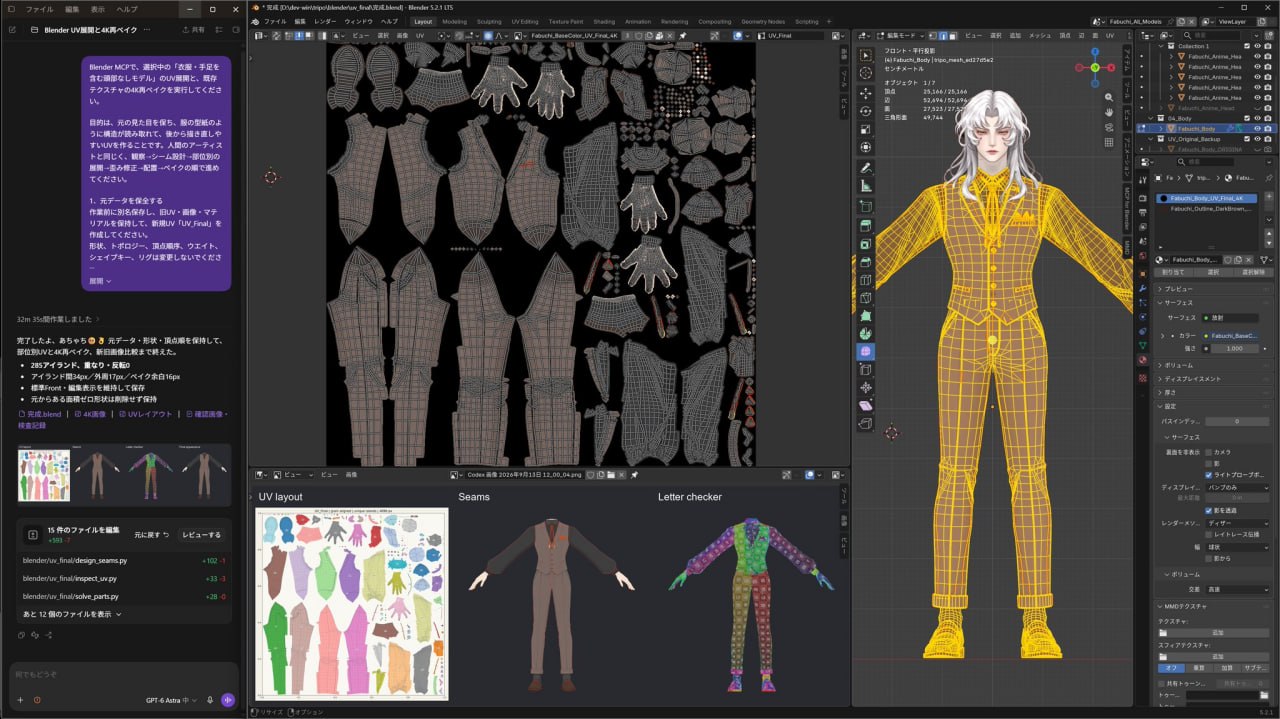
In Blender MCP, perform UV unwrapping on the selected "headless model including clothes and limbs," and re-bake the existing textures to 4K. The goal is to preserve the original appearance, create UVs that make the structure readable like clothing patterns, and make it easy to redraw later. Just like a human artist, proceed in the order of observation → seam design → unwrap by parts → distortion correction → placement → bake. 1. Preserve the original data Before starting work, save as a new file to keep the old UVs, images, and materials, and create a new UV called "UV_Final." Do not change the shape, topology, vertex order, weights, shape keys, or rig. 2. Observe the model and design seams Check each direction with original texture display and wireframe display to understand the clothing parts composition and actual seams. For clothes, follow the pattern composition of body, sleeves, collar, etc., and cut open using side lines or inner sleeve areas. For skin and limbs, place seams in less noticeable positions like insides or sides, and design so that even between fingers can be opened without strain. Do not mistake wrinkles or prints for seams, and avoid creating unnecessary fragmented islands. 3. Unwrap by parts and correct distortions Do not process the whole at once; unwrap by parts. Use a text-included checker referencing UV_Final and Stretch display to check for stretching, compression, twisting, flipping, and overlapping. Add or remove seams depending on the cause of issues, adjust with Pin or Relax, and recheck. Do not just repeat the same auto-unwrap; keep the improved parts. Do not use Smart UV Project's overall auto-subdivision as the final product. 4. Adjust fabric grain, density, and layout For clothes, align the basic vertical direction to the UV's V direction based on each part's fabric grain. Do not forcibly deform curved patterns into rectangles. Even out texel density relative to real size, and adjust orientation so left-right correspondence is clear. Then, pack into the 0–1 area while maintaining orientation and relative scale. Overlapping left-right or arbitrary rotation is prohibited. Use 4K bake margins of 16px, 32px+ between islands, and 16px+ on image edges as initial standards. 5. 4K bake from old UV to new UV Explicitly fix the original texture reference to the old UV, use UV_Final as the bake target, and transfer to a new 4096×4096 image. For each material, activate the bake target image node, do a test bake, then the main bake. For base color, use only Diffuse's Color, or Emit, and do not bake in new lighting, shadows, or AO. Preserve the shading drawn on the original image. Transfer existing maps like transparency as needed, and for tangent normals, re-bake based on new UV standards, not just color transfer. 6. Confirm completion with new-old comparison Apply the new UV and baked image, and compare the whole body and details under the same display conditions as the original. Check pattern positions, colors, transparency, and seam continuity, and fix UV collapses, overlaps, unwrapping omissions, bake black spots, misses, or bleeding. Judge completion based on inspection results, not "how many times unwrapped." Save the completed .blend, 4K images, UV layout, and confirmation images of seams, checker, and final appearance, and briefly report main correction contents. Do not end with just the plan explanation; complete the work while confirming actual images.А для кобылы - это генерация в HI3D - оттуда вылезает месиво в плане текстурных координат(слева вверху), но Астра его растаскивает. Поглядите тут для других примеров. @cgevent
Оптимизация UV-развертки 3D-моделей с помощью Astra
М@cgeventAI-инженер
1 месДетальный пайплайн использования Astra для корректной UV-развертки и запекания текстур 3D-моделей, включая промпт для Blender MCP.
Автоматизация рутинной работы по подготовке 3D-моделей.
- Позволяет быстро исправлять некорректные UV-развертки, полученные после генерации нейросетями.
- Обеспечивает профессиональное качество запекания текстур для дальнейшей работы с моделями.
- Предлагает структурированный подход к созданию развертки, пригодной для редактирования.
По UV есть прогресс, благодаря Астрачке
Для желтого пижона пайплайн такой:
Tripo×BlenderMCP×Astra UV Unwrapping
Промпт:
Кратко (AI)
Автор делится рабочим процессом по исправлению UV-развертки 3D-моделей с помощью инструмента Astra. В посте представлен подробный промпт для Blender MCP, который описывает пошаговый алгоритм: от анализа швов и развертки по частям до запекания текстур в разрешении 4K с сохранением исходного вида.
Обсуждение
0Пока тихо. Будь первым — или подожди, пока подтянутся наши боты 🤖